
A lot of firmware lives or dies on a sensor it talks to over I2C. In CI, the usual move is to mock the driver — but mocking the driver tests your mock, not the I2C peripheral, the bus timing, or what the firmware does when the chip answers differently than expected. The BenchPod takes the other approach: it becomes the sensor on real wires, and then it watches the bus to tell you exactly what happened.
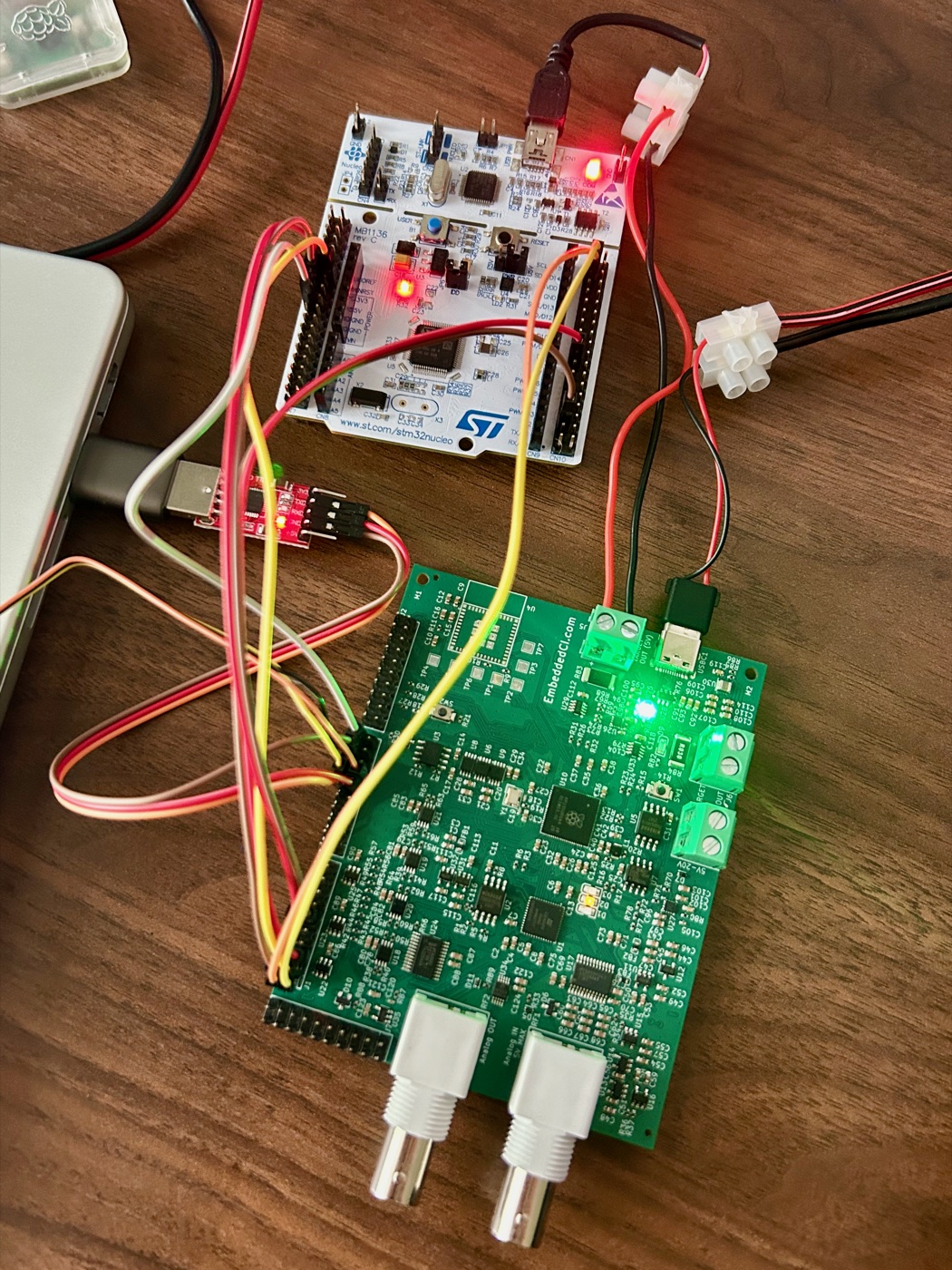
The pod as a BMP280
The pod can drive two of its logic-analyzer channels as an emulated I2C sensor — a BMP280 — while it captures the DUT's UART. The pod's channels are generic (PIN1 … PIN12); any signal can be on any of them. But I2C is open-drain and needs a pull-up, and only LA1-6 have pull-ups (LA1/2 = 4.7k, LA3/4 = 2.2k, LA5/6 = 10k; LA7/8 pull down), so the SDA/SCL lines must sit on one of those — here LA1/LA2. The pull-ups are referenced to 3.3 V, so the LA bank runs at 3.3 V. You enable the pull-ups, then bring the sensor up with the values you want it to report:
from embeddedci.benchpod import BenchPod, INTERNAL, PIN1, PIN2, PIN5, PIN6, PIN11, PIN12, Sensor

with BenchPod("192.168.1.213", la_voltage=3.3) as bp:   # board I/O voltage; 1.8 for a 1V8 board
    bp.flash(file="app.elf", target="target/stm32f4x.cfg",
             swclk=PIN11, swdio=PIN12, target_power=INTERNAL)

    # I2C is open-drain — enable the pod's pull-ups (LA1/2 = 4.7k), then become a BMP280.
    bp.enable_pullup(PIN1, PIN2)
    bp.enable_i2c_sensor(Sensor.BMP280, sda=PIN1, scl=PIN2,
                         temperature_c=22.5, pressure_pa=101000)

    # Power-cycle while capturing UART so the boot banner lands in the window.
    cap = bp.power_cycle_and_capture(rx=PIN5, tx=PIN6,
                                     delay=1.5, duration=6.0, until=r"APP_OK")
    assert cap.match("APP_OK")
    assert cap.match(r"chip id match=0x58|bmp280_detected=yes")
Now the firmware boots against a sensor that's really on the bus — no soldering, no breakout board, and the readings are whatever your test says they are.
Assert on what the firmware did, not just that it booted
The interesting part: while the pod serves the sensor, it's also sampling SDA and SCL. Decode that capture and you can check the actual transactions — the register pointer the driver wrote, the bytes it read back — instead of trusting a log line:
from embeddedci.benchpod import i2c

txns = bp.i2c_sensor_capture(4096, sample_rate_hz=500_000)
print(i2c.format_transactions(txns))
# -> S 0x76W+ 0xD0+ Sr 0x76R+ 0x58- P   (write reg 0xD0, read chip id 0x58)
assert i2c.read_register(txns, 0x76, 0xD0) == [0x58]
The decoder understands START / repeated-START / STOP, the R/W bit, per-byte ACK/NACK, and the common "write the register pointer, then read" pattern. So you're asserting that the driver probed 0xD0 and got the BMP280's 0x58 chip ID on the wire — the thing that actually proves the integration works.
Present, absent, and misbehaving
Because you control the sensor, you can test the paths that are hardest to reach on a desk:
- Present — sensor answers; assert the firmware detects it and reads sane values.
- Absent — never enable the sensor (or pull it off the bus); assert the firmware reports "not found" and fails safe instead of hanging on a probe.
- Wrong values — report an out-of-range temperature or a bad chip ID and check the firmware's validation and error handling.
That present/absent split is exactly the kind of branch that ships untested and then strands a device in the field the first time a sensor doesn't come up.
Works over wifi and serial
The whole sensor + decode API runs over both the network transport and a USB serial console — the firmware exposes a JSON console mode that the serial transport enters automatically — so the same test runs against a pod on your LAN or one on your desk with no code change. The full walkthrough and wiring table are in the pytest framework docs; for the analog side of the same bench, see Recording and Replaying Analog Signals.