
Most embedded CI stops at "it compiled." You can build firmware on a GitHub runner all day, but the runner has no board, no power control, and no debug probe — so the test that matters, does this actually run on the hardware we ship, gets done by hand at someone's desk. That's the gap a BenchPod closes: the pod lives wherever the hardware is plugged in, connects out to embeddedci.com, and your GitHub Action drives it as if it were on the runner.
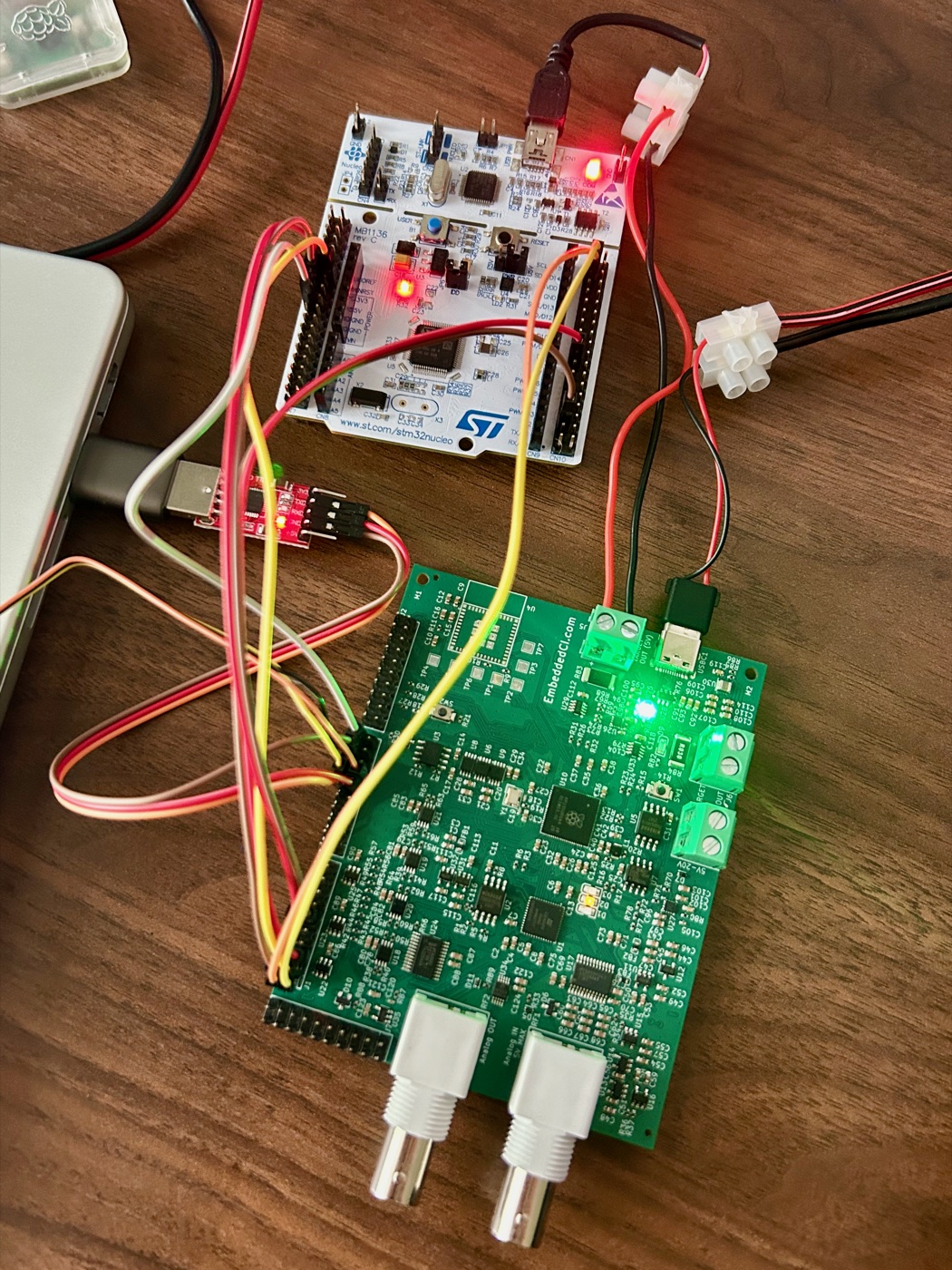
How it fits together
There is no BenchPod on the GitHub runner. The runner does what runners are good at — checking out code and building firmware — and then hands the build to a pod over the cloud:
- The workflow builds the firmware (for example
selftest.c→selftest.elfwith the Arm GNU toolchain). - It installs the
embeddedciPython SDK and runspytest. - The test connects to the device through embeddedci.com using the connection string
embeddedci:<device-name>, flashes the firmware over the tunnel, power-cycles the target, and asserts on the UART output — all on real hardware.
The same test runs unchanged on your desk (point --benchpod-connection at the pod's IP) or in CI (point it at embeddedci:<device-name>).
No secrets — the auth is the OIDC token
Notice what isn't in the workflow: an API key. The job proves which repository it is with a GitHub OIDC token, exactly the way PyPI Trusted Publishing works. The EmbeddedCI server exchanges that token for a short-lived session scoped to the devices your repo is allowed to drive, then bridges a byte tunnel to the pod. Nothing long-lived is stored in GitHub. (Running the same suite from a laptop or a non-GitHub CI system? OIDC only exists inside GitHub Actions, so set BENCHPOD_API_KEY to an API key there instead.)
That requires one line of permissions in the job:
permissions:
  id-token: write   # lets the job mint a GitHub OIDC token for embeddedci
  contents: read
The workflow
A complete job that builds and then runs on a device registered as benchpod-v1.0.0:
name: Selftest (cloud HIL)
on:
  push:
    paths:
      - "selftest-stm32/selftest.c"
      - "selftest-stm32/tests/**"
  workflow_dispatch: {}

permissions:
  id-token: write
  contents: read

jobs:
  selftest:
    runs-on: ubuntu-latest
    steps:
      - uses: actions/checkout@v5

      # Build the firmware on the runner
      - uses: carlosperate/arm-none-eabi-gcc-action@v1
        with:
          release: "13.2.Rel1"
      - run: make -C selftest-stm32

      # Run it on the real board over the cloud
      - uses: actions/setup-python@v6
        with:
          python-version: "3.12"
      - run: pip install pytest "embeddedci[cloud]"
      - run: |
          pytest selftest-stm32/tests -v \
            --benchpod-connection=embeddedci:benchpod-v1.0.0 \
            --benchpod-firmware=selftest-stm32/build/selftest.elf
The workflow carries no LA voltage: the suite sets the board's I/O voltage once in conftest.py (see the pytest docs).
One detail worth knowing: flashing goes through OpenOCD's cmsis-dap adapter (TCP backend), which drives the pod's on-board CMSIS-DAP probe — and that backend only exists in OpenOCD master (post-0.12.0). Ubuntu's packaged openocd is 0.12.0 and fails, so the workflow installs an xPack OpenOCD snapshot on the runner. The full, copy-pasteable setup — including the OpenOCD step — is in the GitHub Actions HIL docs.
The test reads like any other pytest
The cloud is invisible to the test itself. It asks for a benchpod, flashes, and asserts on UART:
from types import SimpleNamespace

import pytest


@pytest.fixture
def wiring(pins):  # this bench's DUT-signal -> LA-channel map (pins are generic LA1-14)
    return SimpleNamespace(swclk=pins.pin_11, swdio=pins.pin_12,
                           uart_rx=pins.pin_5, uart_tx=pins.pin_4, efuse=pins.efuse)


@pytest.mark.hardware
def test_selftest_boots_over_cloud(benchpod, wiring, firmware):
    assert benchpod.flash(
        file=firmware, target="target/stm32f4x.cfg",
        swclk=wiring.swclk, swdio=wiring.swdio,
        target_power=wiring.efuse,
    ).ok

    benchpod.power_off(wiring.efuse)
    benchpod.power_on(wiring.efuse, delay=1.5)
    with benchpod.open_uart(rx=wiring.uart_rx, tx=wiring.uart_tx) as uart:
        assert uart.read_until(r"APP_OK", timeout=12)
Without a connection configured, the benchpod fixture skips instead of failing — so the same suite stays green on runners that don't have a device wired up.
Setting up your project
The one-time setup is two steps in the EmbeddedCI web app: give the device a stable name on the BenchPod page, then trust your repository under BenchPod → GitHub Actions and allow it to drive that device. After that, every push that touches your firmware runs on real hardware. The step-by-step is in Run HIL in GitHub Actions; for the Python side, see the pytest framework docs.