
See whether the test passed
AI Vision verifies embedded tests with a camera. Point it at a screen or at the device itself, and it checks the visible result of every test step. It works from MCP and pytest, the same way as the BenchPod.
Evaluation boards available soon.
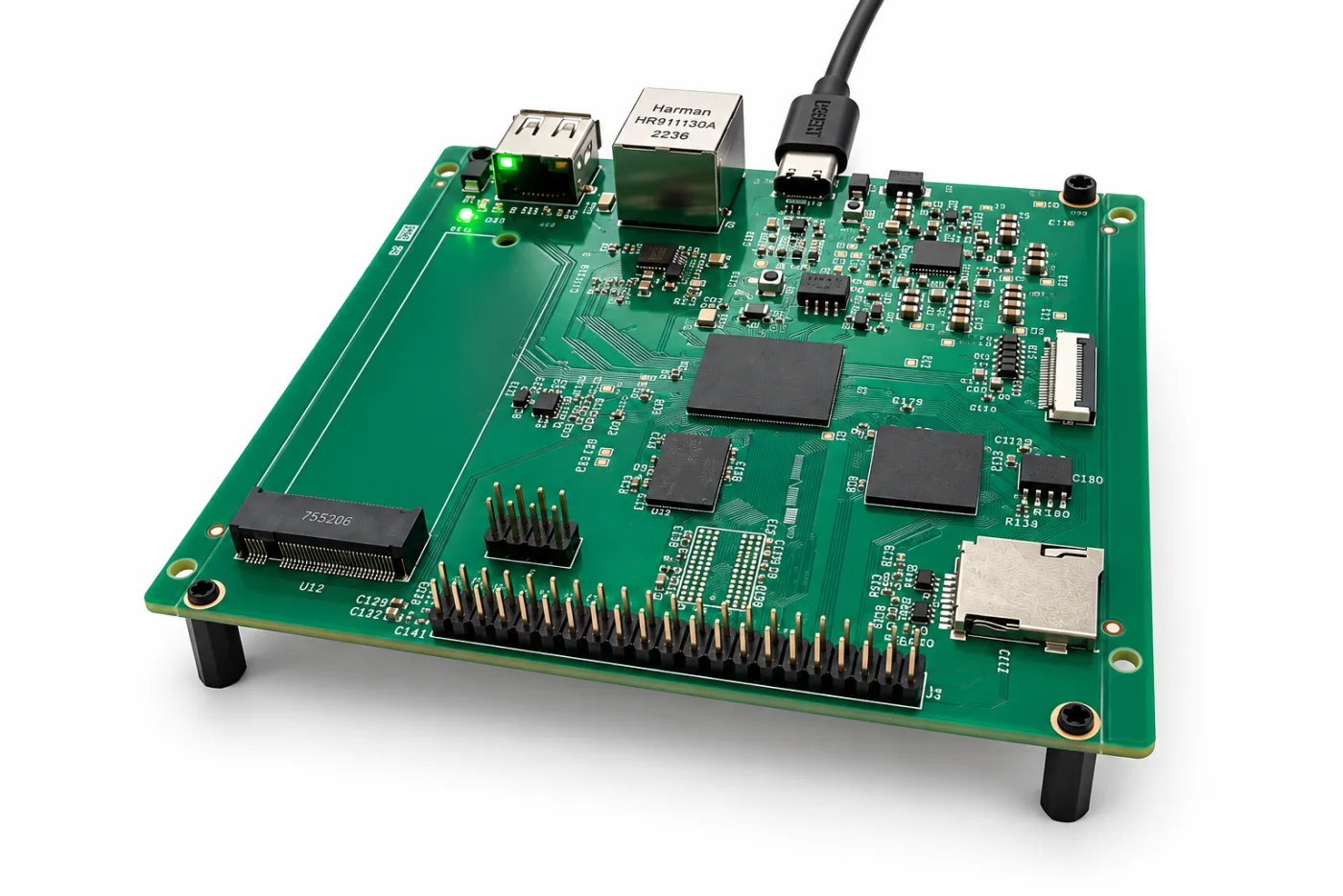
AI Vision evaluation board: a PCIe expansion slot for AI accelerator cards, a MIPI camera connector, Ethernet and USB.
Some results can only be seen
A hardware test can flash the firmware, read the console and measure the current, and still miss what the user sees. Whether the display shows the right value, whether the status LED turned green, whether the screen froze: these are usually checked by a person looking at the bench.
AI Vision automates that check. A camera captures the screen or the device, a model running on the board interprets the image, and the result comes back to your test as a pass or a fail, with the frame attached as evidence.
The hardware
What AI Vision does
Point it at a screen
A display, an HMI panel or a monitor attached to the device. AI Vision reads what is shown and checks it against what the test expects: a value, a message, a screen, an error that should not be there.
Point it at the device
LEDs, segment displays, indicators, moving parts. AI Vision confirms the physical result of a test step, the part a log line cannot prove.
Run the model on the board
Inference runs locally on an AI accelerator card in the PCIe expansion slot. Images stay on your bench, and you choose the card that fits your models and your budget.
Capture with a MIPI camera
Video comes from a MIPI-compatible camera module, so you can pick the lens and resolution that suit the distance and the detail you need to check.
How it works
Three steps from a camera to a test result
01
Mount the camera
Aim the MIPI camera at the screen or the device under test, and connect the board to your network.
02
Run your test
Your pytest suite or your AI agent drives the device as usual, for example through a BenchPod.
03
Ask AI Vision to verify
The board captures a frame, runs the model on the accelerator card and returns a pass or a fail with the image attached.
Integrations
Works with your agent and your test suite
AI Vision uses the same interfaces as the BenchPod, so it fits into the tests you already run.
MCP
An AI agent asks what is on the screen, or whether the LED turned green, as a tool call. Combined with the BenchPod MCP server, one agent can flash a build, power-cycle the device and look at the result.
pytest
Visual checks become ordinary assertions in your Python test suite, next to the BenchPod helpers, and run the same way in GitHub Actions on every push.
Example
“Flash build/app.elf, power-cycle the board and check that the display shows the firmware version and no error icon.”
The agent flashes and power-cycles the device through the BenchPod, then asks AI Vision what the display shows and reports the result with the captured frame.
Frequently asked questions
What is AI Vision?
AI Vision is a test instrument that verifies results visually. A MIPI camera watches a screen or the device under test, and an AI accelerator card in the board’s PCIe expansion slot runs the model that decides whether the test step succeeded.
When is it available?
AI Vision is in development and not ready to ship. Evaluation boards will be available soon. Join the waiting list to be among the first to receive one.
Does it work with the BenchPod?
Yes. Both are driven from the same MCP and pytest workflow, so one test can control the device through the BenchPod and check the visible result with AI Vision.
Do the images leave my network?
No. Inference runs on the accelerator card on the board itself, next to your device.
Evaluation boards available soon
Join the waiting list and we will contact you when the first evaluation boards are ready.