
AI hardware-in-the-loop (AI HIL)
Give your AI agent a real bench. The BenchPod MCP server turns power control, firmware flashing, UART capture, sensor emulation and analog/logic capture into tools an LLM can call, so Claude flashes, power-cycles and probes actual silicon instead of guessing about it.
Free sample board. Every request is reviewed case by case.
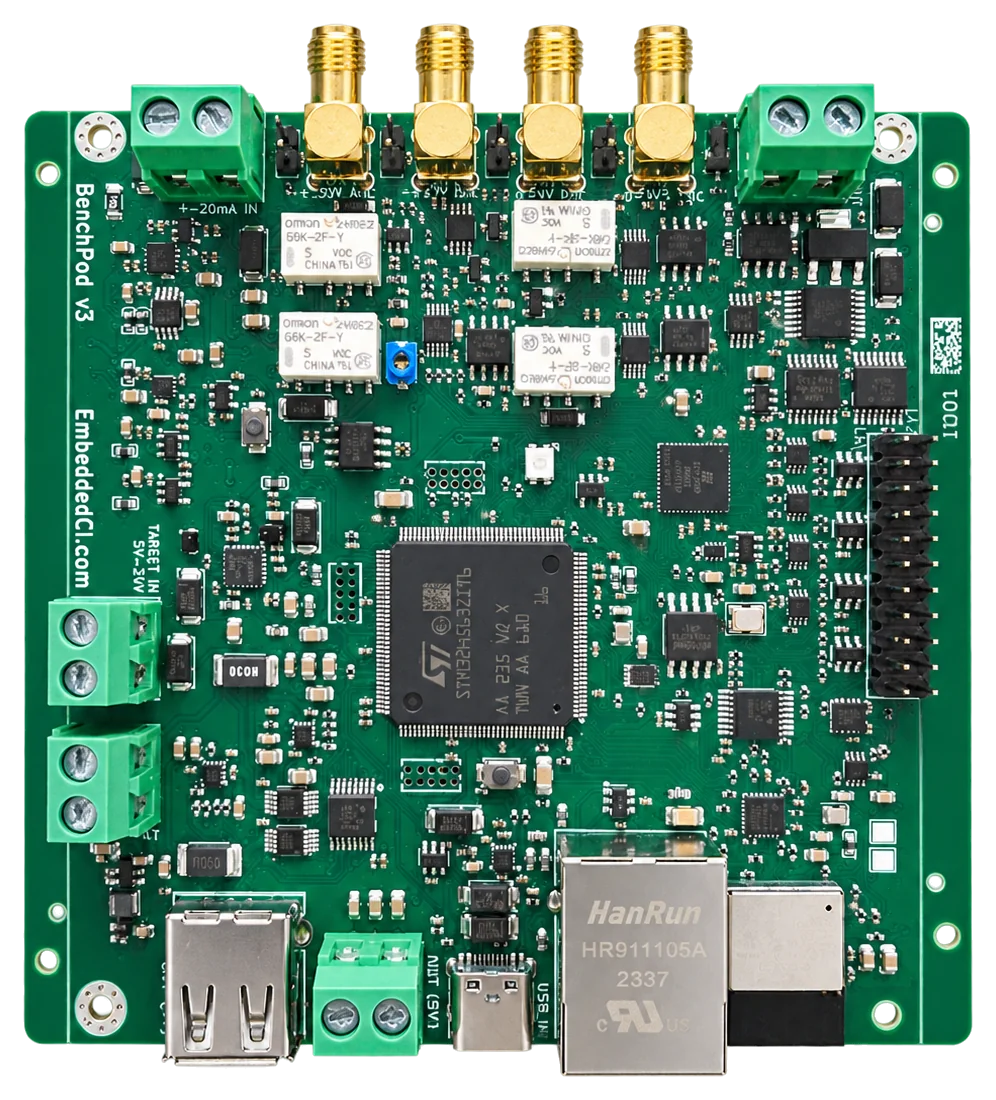
BenchPod: our compact instrument that makes target hardware CI ready, with digital I/O and 16-bit analog I/O (400 kSPS, ±30 V).
What is AI hardware-in-the-loop?
Hardware-in-the-loop testing runs your firmware on the real board, with the bench standing in for the world around it. AI HIL is that loop driven by an agent instead of a hand-written script. The instruments are exposed over the Model Context Protocol (MCP), so an AI assistant can power the target, flash a build, watch the boot log, pretend to be a sensor and read back what the firmware did, each as a tool call against hardware that is genuinely there.
The point is not the novelty of an AI touching hardware. It is the loop: flash, observe, change one variable, re-test. That loop is where bring-up time actually goes, and it is the part that has never been automatable, because every step needed a human to decide what to try next.
The hardware
What the BenchPod does
A test bench is usually a power supply, a debug probe, a UART adapter, a logic analyzer and a signal generator, each with its own cables and quirks, on one engineer’s desk. The BenchPod folds all of them into one networked box that sits next to your board. Every operation is an API call, so a test, a CI job or an AI agent can do what used to need a person at the bench.
Power and reset
Switch the target through protected eFuses (internal 5 V or your own supply), power-cycle it, pull reset, and measure current per rail.
Flash and debug over SWD
The pod is itself a CMSIS-DAP probe on the network. Any OpenOCD target works: STM32, nRF, and the rest.
UART console
Capture the boot log to assert on it, or hold an interactive console and drive the firmware’s command line.
Logic analyzer, I2C and CAN
14 channels to watch and drive GPIO at 1.8 V or 3.3 V, decode I2C and emulate an I2C sensor. A CAN transceiver answers on the bus like a real ECU.
16-bit analog front-end
A 400 kSPS ADC with a ±30 V range and a 16-bit DAC: capture a real signal, replay it into the target, or inject a fault.
On the network
Ethernet, Wi-Fi or USB. Through the EmbeddedCI cloud a runner or an agent anywhere drives a pod on your desk.
Inside, an STM32H563 runs the network, the command server and the policy, and an iCE40 FPGA with 8 MB of PSRAM does the timing: logic and analog capture, DAC streaming and SWD, at the sample clock with no CPU in the loop. Captures stream into the PSRAM, so one recording can run for seconds. Meet the BenchPod has the full tour.
Two ways to drive it
BenchPod AI HIL
Give Claude, Cursor or your own agent the bench as MCP tools. It flashes, power-cycles and probes the board, and closes the loop the way an engineer would.
BenchPod pytest SDK
pip install embeddedci and write hardware tests as ordinary pytest tests. The same suite runs against a pod on your desk and in GitHub Actions on every push.
See BenchPod pytest SDK →Try a BenchPod on your own board
Tell us what you want to test. We review every request case by case, and if you have a use case to evaluate it on, we send you a sample board free of charge.
1
Tell us your use case
Which board you want to test, and what you want to find out.
2
We review it
A person reads every request, usually within a few business days.
3
We send a sample
Free of charge, when the BenchPod fits what you are evaluating.
An evaluation board: a bare board with breakouts and jumper wires, and firmware and docs that are still moving.
How it works
From a sentence to a measurement on real hardware
01
Wire your board to the BenchPod
Connect the device under test to the pod: power through the protected eFuse rails, SWD for flashing, UART for the console, and whichever I2C, analog or logic lines you want to drive and watch.
02
Point your agent at the bench
The BenchPod ships an MCP server. One line of config in Claude Desktop, Claude Code, Cursor or your own agent, and the whole bench becomes callable tools.
03
Describe the test, not the commands
“Flash this build, power-cycle it, and tell me whether it reached APP_OK.” The agent picks the tools, wires the sequence and reads the results.
04
Let it close the loop
Failures name their cause and a failed flash or boot comes back with its logs, so the agent can change one variable and re-run, the way an engineer at the bench would.
05
Freeze what worked into CI
Every MCP tool has a matching Python test helper, so the sequence you found by asking turns into an automated test that runs on every push.
The MCP toolset
What the agent can actually do
Every tool below is a real bench operation on the BenchPod, not a wrapper around a simulator.
Power and reset
Gate the target through protected eFuses, cut it mid-write, pull reset, watch the current draw.
Flash and console
Program firmware over SWD from the pod itself, then read the boot log and type into the console.
Peripheral simulation
Be the sensor the firmware expects or the ECU it talks to, and answer the way you choose.
Analog and logic
Generate signals, capture them back, and decode the bus traffic around them.
What it looks like in practice
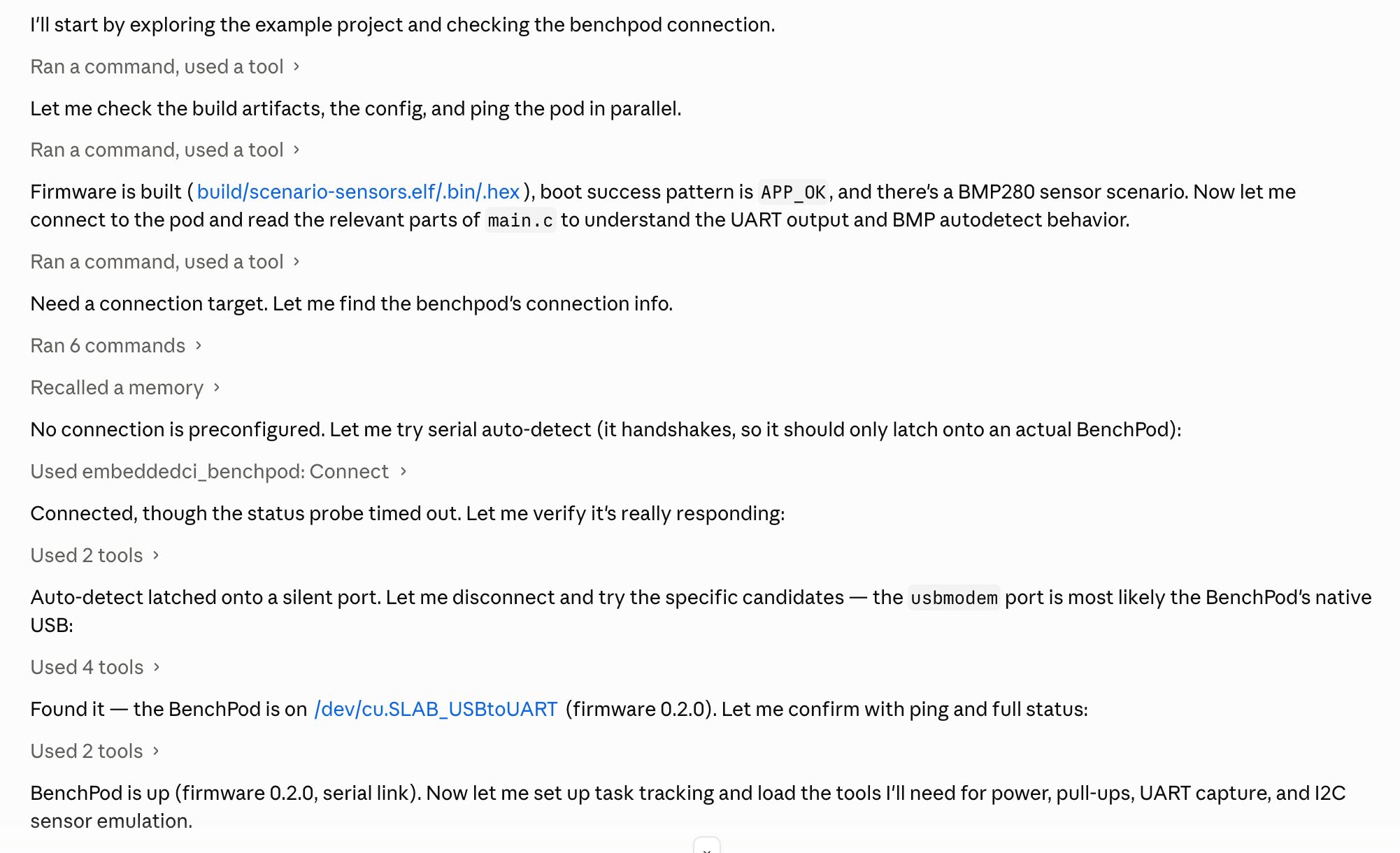
“Connect to the bench, flash build/app.elf to the STM32F4 over SWD, then power-cycle the target and show me the boot log.”
The agent calls connect, flash and power_cycle_and_capture, reads the UART back and tells you whether it saw APP_OK.
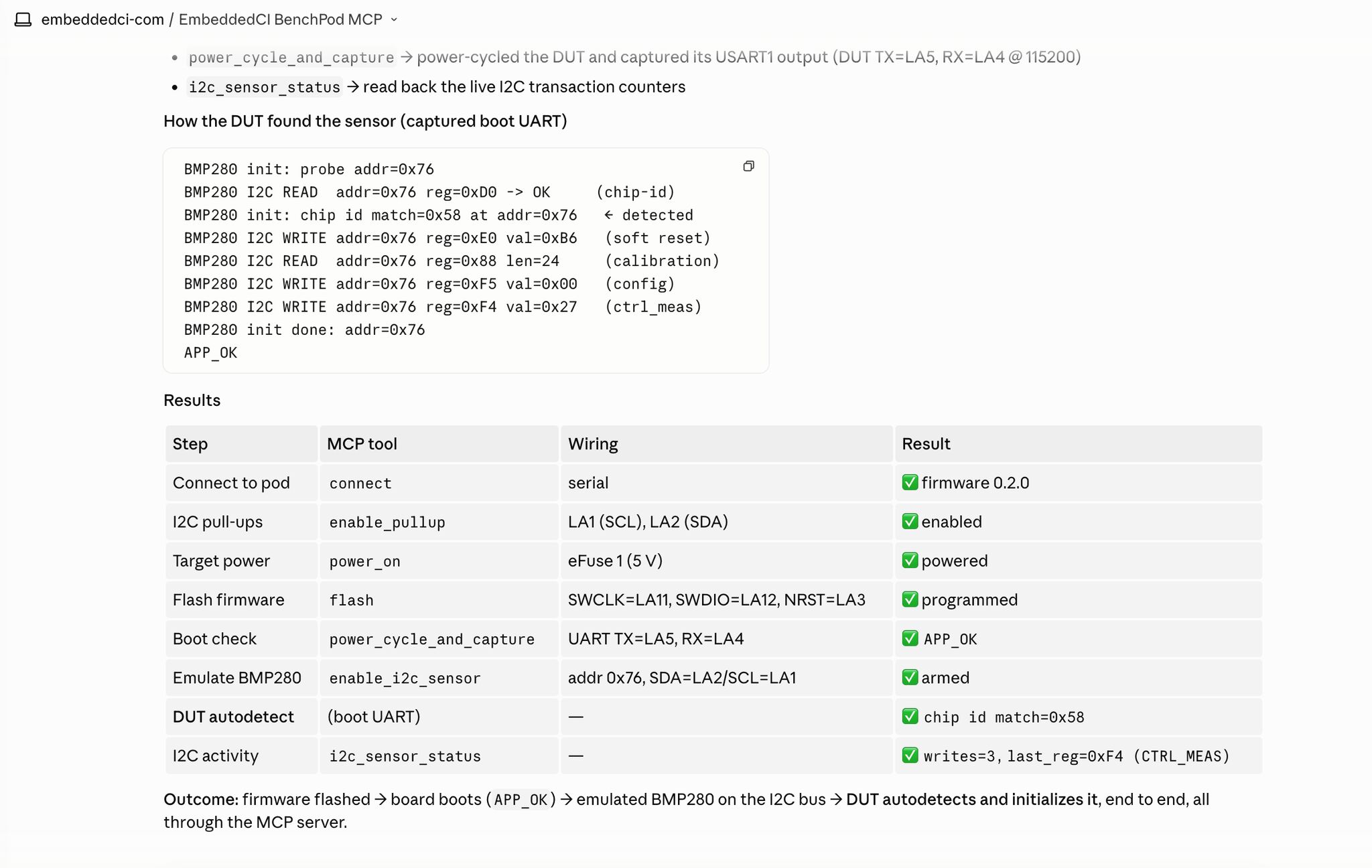
“It hung before the sensor init. Pretend to be a BMP280 on the I2C lines and try again.”
It enables the pull-ups, brings up the emulated sensor with enable_i2c_sensor, re-runs the power-cycle, and checks i2c_sensor_capture to confirm the firmware really probed the chip.
Where it pays off
Four places AI HIL earns its keep
Bring-up on an unfamiliar board
The agent reads the wiring resource, powers the target, flashes it and narrates where the boot stops, before you have written a single script.
Reproducing a flaky failure
Ask for fifty power cycles, and get back the ones that failed with their captured UART and current draw.
Fault injection you would not script by hand
Sag the supply, stall the sensor, corrupt the reply: each is one tool call, so exploring the fault space costs a sentence instead of an afternoon.
Triage from a failing pipeline
A HIL job goes red at 2am. The agent reconnects to the same pod, re-runs the step and comes back with the capture attached.
The agent explores. CI decides.
A model in the loop is the wrong thing to gate a release on. So the handoff is explicit: every MCP tool has a matching helper in the BenchPod pytest SDK, and the sequence the agent found becomes an ordinary hardware test that runs the same way every time in GitHub Actions on every push.
Frequently asked questions
What is AI hardware-in-the-loop (AI HIL)?
AI hardware-in-the-loop is hardware-in-the-loop testing driven by an AI agent instead of a hand-written script. The test bench exposes its instruments (power control, firmware flashing, UART capture, I2C sensor emulation, analog generation and logic capture) as tools an LLM can call, so the agent can flash a board, observe the result, change one variable and re-test on real silicon.
How does the BenchPod MCP server work?
The BenchPod MCP server (embeddedci-mcp) implements the Model Context Protocol over the BenchPod SDK. Bench operations map to typed MCP tools, the server hands the agent usage instructions when it connects, and a wiring resource describes how the bench is connected before it starts. Any MCP-capable client can connect to it: Claude Desktop, Claude Code, Cursor, or your own agent.
Is the AI running the tests in production CI?
No. The agent is for exploration and triage. Once a sequence is worth keeping, the same operations are available as ready-made building blocks for automated Python tests, which run the same way every time in GitHub Actions, with no model in the loop.
Does the agent need direct access to my hardware?
It talks to the pod, not to your network. A pod can be reached over the LAN, over USB serial, or through the EmbeddedCI cloud with a per-device lease, so a remote agent drives a bench sitting on your own desk.
Do I need a BenchPod to do AI HIL?
The BenchPod is what we build on, but the pattern is the deliverable: an instrumented fixture around your board with an agent-callable interface. We also fit it to rigs that already exist.
Put an agent on your bench
Request a free sample and try the loop on your own board, or book a call and we will set it up with you: what you are bringing up, and how you test it today.
- A fixture and wiring map for your target.
- The MCP server connected to your agent of choice.
- The sequences that matter, frozen into a pytest HIL suite in CI.
Free sample board. Every request is reviewed case by case.