
Hardware-in-the-loop testing with pytest
pip install embeddedci and your hardware tests are ordinary pytest tests. They flash the real board, power it, pretend to be its sensors and check what it did, on your desk and in CI on every push.
Free sample board. Every request is reviewed case by case.
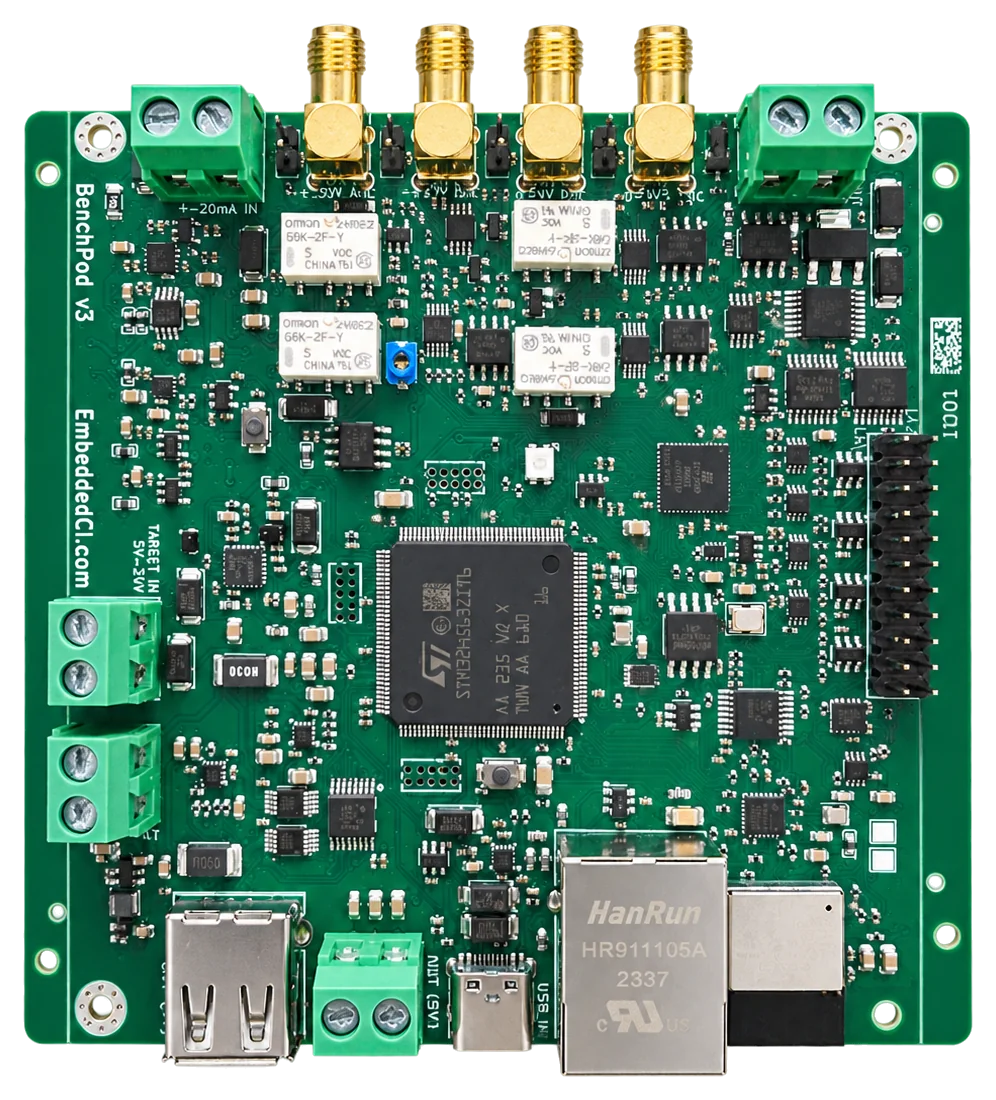
BenchPod: our compact instrument that makes target hardware CI ready, with digital I/O and 16-bit analog I/O (400 kSPS, ±30 V).
Firmware tests that run on the real board
Unit tests stop at the edge of the chip. The regressions that ship are on the other side of it: a boot that hangs when the sensor is slow, a brown-out that corrupts a write, a driver that works on the dev kit and not on your board. Hardware-in-the-loop testing runs the firmware on the real board, with the bench standing in for the world around it.
The BenchPod pytest SDK makes that bench a Python object. Every instrument on the pod is a method, and the pytest plugin hands tests a connected pod as a fixture, so a hardware test reads like any other test and runs in the pipeline you already have.
The hardware
What the BenchPod does
A test bench is usually a power supply, a debug probe, a UART adapter, a logic analyzer and a signal generator, each with its own cables and quirks, on one engineer’s desk. The BenchPod folds all of them into one networked box that sits next to your board. Every operation is an API call, so a test, a CI job or an AI agent can do what used to need a person at the bench.
Power and reset
Switch the target through protected eFuses (internal 5 V or your own supply), power-cycle it, pull reset, and measure current per rail.
Flash and debug over SWD
The pod is itself a CMSIS-DAP probe on the network. Any OpenOCD target works: STM32, nRF, and the rest.
UART console
Capture the boot log to assert on it, or hold an interactive console and drive the firmware’s command line.
Logic analyzer, I2C and CAN
14 channels to watch and drive GPIO at 1.8 V or 3.3 V, decode I2C and emulate an I2C sensor. A CAN transceiver answers on the bus like a real ECU.
16-bit analog front-end
A 400 kSPS ADC with a ±30 V range and a 16-bit DAC: capture a real signal, replay it into the target, or inject a fault.
On the network
Ethernet, Wi-Fi or USB. Through the EmbeddedCI cloud a runner or an agent anywhere drives a pod on your desk.
Inside, an STM32H563 runs the network, the command server and the policy, and an iCE40 FPGA with 8 MB of PSRAM does the timing: logic and analog capture, DAC streaming and SWD, at the sample clock with no CPU in the loop. Captures stream into the PSRAM, so one recording can run for seconds. Meet the BenchPod has the full tour.
Two ways to drive it
BenchPod AI HIL
Give Claude, Cursor or your own agent the bench as MCP tools. It flashes, power-cycles and probes the board, and closes the loop the way an engineer would.
See BenchPod AI HIL →BenchPod pytest SDK
pip install embeddedci and write hardware tests as ordinary pytest tests. The same suite runs against a pod on your desk and in GitHub Actions on every push.
Try a BenchPod on your own board
Tell us what you want to test. We review every request case by case, and if you have a use case to evaluate it on, we send you a sample board free of charge.
1
Tell us your use case
Which board you want to test, and what you want to find out.
2
We review it
A person reads every request, usually within a few business days.
3
We send a sample
Free of charge, when the BenchPod fits what you are evaluating.
An evaluation board: a bare board with breakouts and jumper wires, and firmware and docs that are still moving.
What a test looks like
A hardware test is a pytest test
Flash the build, then boot it with an emulated BMP280 on the I2C lines and wait for the firmware to say it is up.
import pytest
from embeddedci.benchpod import Sensor

@pytest.mark.hardware
def test_firmware_flashes(benchpod, firmware):
    # SWD pins, target and power rail come from the bench's wiring profile
    assert benchpod.flash(file=firmware, target="target/stm32f4x.cfg").ok


@pytest.mark.hardware
def test_boots_with_sensor(benchpod_target, pins):
    # I2C is open-drain: the pod's pull-ups go on the lines, then the pod
    # answers as a BMP280 while the firmware boots.
    benchpod_target.enable_pullup(pins.pin_1, pins.pin_2)
    benchpod_target.enable_i2c_sensor(Sensor.BMP280, sda=pins.pin_1, scl=pins.pin_2,
                                      temperature_c=22.5, pressure_pa=101000)
    cap = benchpod_target.power_cycle_and_capture(duration=6.0, until=r"APP_OK")
    assert cap.match("APP_OK")
Install, and run it against a pod:
pip install embeddedci
pytest --benchpod-connection=192.168.1.213 --benchpod-firmware=build/app.elf
benchpodA connected pod for the session. Skips when no connection is set.
benchpod_targetThe pod with the target powered on for the test and off at teardown.
pinsThe 14 logic-analyzer channels and the target-power rail.
firmwareThe image from --benchpod-firmware, for tests that flash.
benchpod_sensorDisarms any emulated I2C sensor at teardown.
benchpod_dacStops any DAC output at teardown.
The SDK
What your tests can do
Units are volts, seconds and hertz, results come back typed, and a failure raises with its cause.
Flash and boot
Program the build over SWD, power-cycle, and assert the boot banner arrived before the timeout.
Power and brown-out
Switch rails, read the eFuse state, measure the current draw, and profile power over a whole run.
Peripherals the firmware expects
Be the I2C sensor or the CAN node on the other end, answer the way the test chooses, then check what the firmware sent.
Analog and logic
Read a voltage, capture a waveform, replay a recorded signal into the target, and capture GPIO while it happens.
How it works
From a board on the bench to a test on every push
01
Wire the board to a BenchPod
Power through the eFuse rails, SWD for flashing, UART for the console, and whichever I2C, analog or logic lines the tests need. The wiring profile records which signal is on which channel.
02
Put the pod on your network
Ethernet, Wi-Fi or USB, found from the CLI. Register it with EmbeddedCI to reach it from anywhere, or just use its IP address.
03
pip install embeddedci
One package, Python 3.10 or newer. Installing it registers the pytest plugin, so the fixtures are there without any setup code.
04
Run pytest
Tests take a connected pod as a fixture. Without a pod configured they skip instead of failing, so the same suite stays green on a laptop with no hardware.
05
Run the same suite in CI
On a runner next to the bench, or from GitHub Actions through embeddedci.com to a pod anywhere, authenticated with the job’s OIDC token and no stored secrets.
Found by an agent, kept as a test
The operations here are the same ones BenchPod AI HIL gives an AI agent over MCP. Let Claude explore a new board or triage a failure, then keep the sequence that mattered as a pytest test that runs the same way every time.
Frequently asked questions
What is the BenchPod pytest SDK?
It is the embeddedci Python package and its pytest plugin. It drives a BenchPod from Python: power the target, flash it over SWD, capture its UART, emulate an I2C sensor, answer on CAN, and generate and capture analog and logic signals. Tests use it through pytest fixtures, so a hardware test is written like any other test.
How do you do hardware-in-the-loop testing with pytest?
Install embeddedci, point pytest at a BenchPod with --benchpod-connection, and request the benchpod fixture in a test. The test flashes the real board, powers it, stimulates its inputs and asserts on what it did. Mark such tests with @pytest.mark.hardware; without a pod configured they skip, so the suite still runs where no hardware is wired up.
Which microcontrollers and boards are supported?
Anything OpenOCD can flash over SWD, which covers STM32, nRF and most Arm Cortex-M parts; the target is one argument such as target/stm32f4x.cfg. The pod’s I/O runs at 1.8 V or 3.3 V, and it can power the target from its own 5 V rail or switch your supply.
Can the same tests run locally and in CI?
Yes. Only the connection string changes: an IP address or USB on your desk, and embeddedci:<name> in CI, where GitHub Actions reaches the pod through embeddedci.com with the job’s OIDC token. The cloud path holds an exclusive lease on the pod, so two jobs never share a bench.
How does it relate to BenchPod AI HIL?
They drive the same pod with the same operations. BenchPod AI HIL gives them to an AI agent over MCP for exploration and triage; the pytest SDK freezes the sequences worth keeping into tests that run the same way every time, with no model in the loop.
Put your board in the test suite
Request a free sample and write your first tests against your own board, or book a call and we will build the suite with you.
- A BenchPod and a wiring profile for your target.
- The first tests: flash, boot, and the peripherals that matter.
- The suite running in your CI on every push.
Free sample board. Every request is reviewed case by case.